Editing a design may soon feel less like using software—and more like having a conversation.
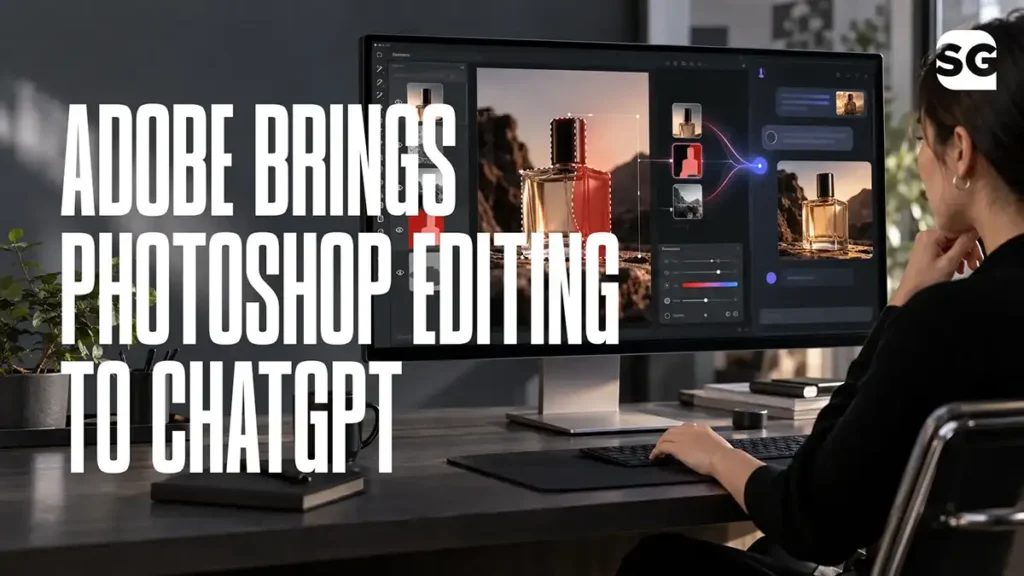
Adobe has introduced interactive Photoshop- and Adobe Express-powered editing controls inside ChatGPT.
Users can describe the change they want, select a specific part of an image and then fine-tune the result using controls for colour, saturation, contrast and other adjustments—all without leaving the ChatGPT conversation.
This is more than another AI feature. It signals an important change in how people will discover, edit and use design assets.
For designers, template creators and websites offering downloadable PSD files, the message is clear:
A downloadable file is no longer the finished product. It is the starting point of an AI-assisted workflow.
What has Adobe added to ChatGPT?
Adobe’s updated ChatGPT plugin combines conversational instructions with hands-on editing.
Instead of opening an image in Photoshop and searching through menus, a user can ask ChatGPT to make a specific change.
For example:
- Remove an unwanted object from a photograph
- Change the colour of a product
- Adjust the brightness of one selected area
- Improve contrast or saturation
- Modify text and design elements
- Refine an Adobe Express design
- Edit or highlight parts of a PDF
Users can select an object or brush over an area, describe the required change and then adjust the result using interactive controls.
The conversation and editor remain connected. This means the user can move between prompting and manual adjustments without uploading the asset again or explaining the entire task from the beginning.
Adobe says the new experience is rolling out globally across ChatGPT’s web and app versions.
Why this update matters
Until recently, AI image editing and professional design editing were mostly separate activities.
A user could generate an image with AI, but often needed Photoshop or another application to correct it properly.
Adobe is now bringing both activities into the same environment.
A user can:
- Describe the desired result.
- Generate or modify the visual.
- Select a specific area.
- Fine-tune the edit.
- Continue the conversation using the edited version.
This removes several technical steps from the creative process.
People who do not know Photoshop well can still make targeted changes. Experienced designers can use conversation to complete repetitive work faster, then take control when precision is required.
The result is not the death of design software. It is a change in how people access its capabilities.
Does this mean PSD templates are becoming irrelevant?
No—but basic PSD templates are becoming easier to replace.
Consider a simple social-media template containing:
- One background image
- A headline
- A coloured shape
- A call-to-action button
- A logo placeholder
Previously, a user might download the PSD because it offered a convenient way to make these changes.
Now, that user may be able to upload a flattened design and ask ChatGPT to:
- Replace the photograph
- Change the colour scheme
- Rewrite the headline
- Remove an object
- Adjust the contrast
- Prepare a new variation
The technical advantage of owning the PSD becomes smaller when AI can understand and edit parts of an image conversationally.
But that does not make every template unnecessary.
It makes generic templates less valuable and well-structured design systems more valuable.
The opportunity: move from “editable PSD” to “AI-ready design”
An editable PSD usually promises that users can change the text, images and colours.
An AI-ready design should go further.
It should help the user customize, extend and repurpose the design through both traditional editing software and AI tools.
A useful AI-ready design bundle could include:
- A properly layered PSD file
- A flattened JPG or PNG reference
- Separate transparent PNG elements
- Clearly named layers and groups
- Editable text, colours and image placeholders
- Free or accessible font alternatives
- A tested AI customization prompt
- Instructions explaining what can be changed
- Suggested formats for posts, stories and advertisements
- Commercial-use and licensing information
For example, instead of offering one restaurant promotion PSD, the bundle could provide:
- Square Instagram post
- Vertical Instagram Story
- Promotional advertisement
- Menu highlight design
- Transparent food and decorative elements
- Prompt for changing the cuisine or offer
- Prompt for adapting the design to another restaurant brand
The value is no longer one attractive layout.
The value is a complete system that helps the user create more assets with less effort.
What template creators should do now
1. Stop competing only on appearance
A beautiful design can now be imitated or generated quickly.
Template creators need to compete through usability, structure, relevance and consistency.
A coordinated campaign kit is harder to replace than one attractive social-media post.
2. Create templates around real business needs
Generic “modern business social-media post” templates will face increasing competition from AI generators.
Specific templates remain more useful.
Examples include:
- Indian restaurant festival campaigns
- Real-estate project launch packs
- Salon seasonal promotion kits
- Clinic awareness campaigns
- Local retail sale designs
- Coaching-class admission campaigns
- Wedding and event promotion packs
Specific use cases reduce the amount of thinking and customization required from the user.
3. Include prompts with every important asset
A prompt should not be added simply because AI is popular.
It should solve a practical customization problem.
For example:
Use this design as the visual reference. Replace the existing product with a premium leather handbag. Preserve the composition, lighting direction, headline area and brand-logo position. Change the colour palette to deep burgundy, cream and muted gold. Keep the result elegant, realistic and suitable for an Instagram advertisement.
A useful prompt turns the template into an adaptable creative starting point.
4. Separate important visual elements
AI editing becomes more reliable when users have access to clean source elements.
Where possible, provide:
- Transparent products
- Isolated people
- Backgrounds without text
- Decorative elements
- Text-free design versions
- Logo-safe layouts
- Clean image masks
This gives users more control whether they work in Photoshop, Affinity, Adobe Express or an AI editor.
5. Build collections instead of isolated downloads
One template solves one immediate problem. A collection helps a business maintain consistency across a campaign.
That makes collections more valuable to users and gives design websites a stronger opportunity to create premium products.
What this means for AllFreePSD
AllFreePSD should not position itself as a website with a large number of free PSD files.
That position will become weaker as Canva, Adobe, ChatGPT and other AI platforms make basic design creation easier.
A stronger position would be:
Free designs prepared for real business use and AI customization.
The site can begin by converting a small group of high-performing templates into AI-ready bundles.
Each upgraded bundle could contain:
- Original layered PSD
- High-resolution preview
- Text-free version
- Transparent design elements
- Recommended fonts
- Paste-ready editing prompt
- Common customization instructions
- Suggested business applications
- Relevant commercial-use guidance
An “AI-Ready” badge can help visitors immediately identify these enhanced assets.
However, the badge must represent a real standard. Simply adding “AI-ready” to an ordinary PSD will not create meaningful value.
The bigger change has already started
Adobe is not merely adding AI to Photoshop.
It is placing Photoshop capabilities inside the conversational platforms where users are already planning, writing and creating.
This changes the design journey.
The old journey looked like this:
Search → Download → Open software → Learn the tools → Customize → Export
The emerging journey looks more like this:
Describe → Select a starting asset → Ask for changes → Fine-tune → Export
Template platforms must adapt to this behaviour.
People will still need strong ideas, useful layouts and professionally prepared visual assets. But they will expect those assets to work smoothly with AI-assisted editing.
Final thought
AI will not eliminate the need for templates. It will eliminate the value of templates that offer nothing beyond a basic layout.
The future belongs to design assets that combine professional structure with flexible AI customization.
For AllFreePSD, the right response is not to produce more files.
It is to make every important file more useful.
That means moving from downloadable PSDs to complete, AI-ready creative systems.
Explore our growing collection of editable templates and AI-ready design resources created for practical business use.